 Idle
 Running
Separate by design
Every instance gets its own data folder, sign-in and settings. Nothing crosses between accounts.
Every instance gets its own data folder, sign-in and settings.
 InstanceDeck
Multi-instance app launcher for Windows
Keep work, personal and client accounts open at the same time — each in its own isolated profile, launched from the official app you already have.
Free and open source · Windows 10 and 11 · x64 and ARM64 · No telemetry
Works with
Why InstanceDeck
InstanceDeck gives every account its own profile, so the apps you rely on behave as if each one were the only one running.
Every instance gets its own data folder, sign-in and settings. Nothing crosses between accounts.
Every instance gets its own data folder, sign-in and settings.
InstanceDeck starts the app you installed with its own launch settings. No patches, copies or repacks, so your updates keep working.
Launched with its own settings. No patches, copies or repacks.
No telemetry, no accounts, no background services. InstanceDeck never reads your passwords or session tokens.
No telemetry, no accounts. Never reads passwords or tokens.
How it works
InstanceDeck finds your installed apps, including Microsoft Store versions, and shows which ones it has verified.
Name it, give it a colour and choose where its data lives — on this drive or another.
Each profile opens in its own window with its own taskbar identity. Pin it, and the pin reopens that profile.
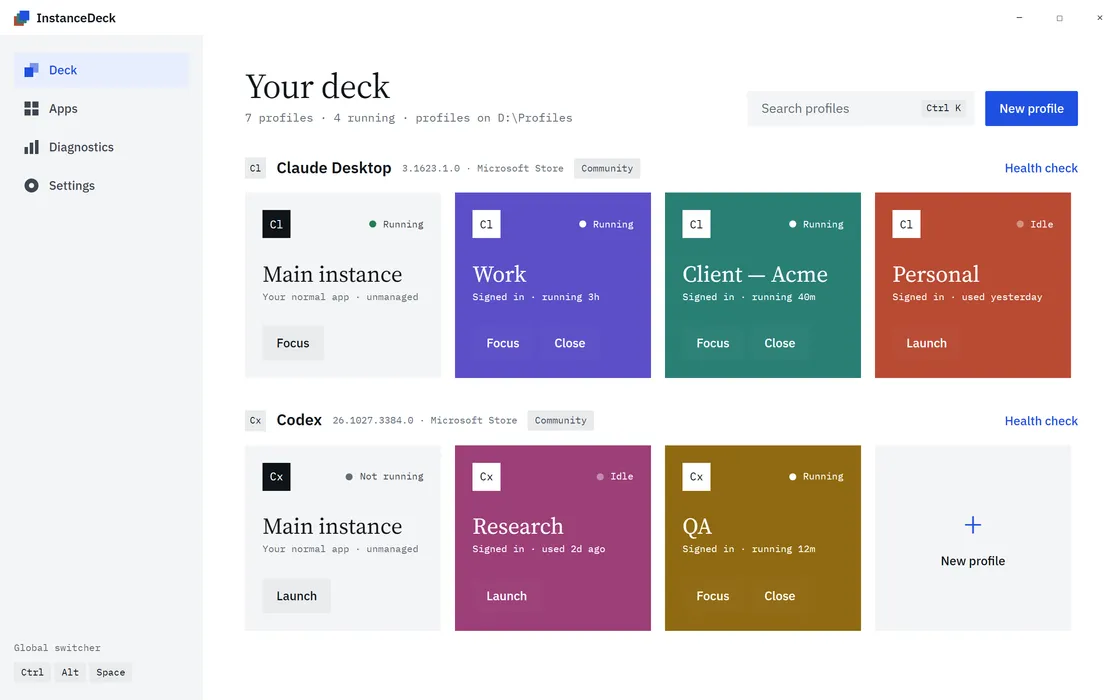
Use cases
If you hold more than one account for the same app, InstanceDeck keeps each one open, signed in and separate.
Keep company and personal subscriptions in separate windows, side by side.
Isolate projects, MCP servers and history for each engagement.
Run Claude Code or Codex threads under separate identities at the same time.
Reproduce issues in a clean profile without touching your own.
Claude Desktop
Each profile has its own sign-in, chats, settings and MCP configuration. A guided sign-in handles Windows’ single claude:// callback and puts your main account back automatically.
Read the Claude Desktop guide →Codex
Each profile runs with its own CODEX_HOME and app data, so sign-ins, sessions and settings never collide — and you can check that every profile shows its own account.
Read the Codex guide →Security and privacy
Profiles are isolation, not a sandbox. The threat model, every launch flag and the source are public, so your security team can check each claim.
Read the security model →MIT licensed, built in public
No analytics, no accounts
Never reads cookies or tokens
Official binaries, untouched
Deleted profiles stay recoverable
No. InstanceDeck launches the official app with different launch settings and data folders. Nothing is patched, copied or repackaged, so the app's own updates keep working.
Yes. Each profile signs in once using the guided sign-in, then stays signed in. Your main Claude keeps working as before.
InstanceDeck is meant for keeping accounts you own separate, such as work and personal. Do not use it to share accounts or to get around usage limits. Check each provider's terms for your situation. This is not legal advice.
On your PC, in a folder you choose. The default is %LOCALAPPDATA%\InstanceDeck\Profiles. Nothing is uploaded.
InstanceDeck releases are unsigned, so Windows may warn or block installation. Verify the source and published SHA-256 checksums, and review the code signing policy before installing.
No. It is an independent open-source project. Product names identify compatibility; they do not imply endorsement.
Requires the official app to be installed. Works with Microsoft Store and standard installs.